Thursday, November 21, 2013

Breathtaking timelapse of the American landscapes

Dustin Farrell, photographer and videographer, is known for his time-lapse photography dedicated to the vast open spaces of America. Today you will discover beautiful landscapes, from Utah to Arizona.


To achieve such a result, the photographer took dozens of photographs on the same site retaining its framework or by slightly moving his camera between each shot.
In this time-lapse, we can see the evolution of the nature: stars and clouds that pass, the sunset, and much more...

Nukemap: detonate a nuclear bomb anywhere


Have you ever wondered what impact could have a nuclear bomb on your city? Nukemap proposes to answer this question. Designed by Alex Wellerstein, a researcher at the American Institute of Physics, the website will show you the impact of a nuclear bomb anywhere on Earth.
After choosing the place where the bomb explode, you must choose the type of material used: you will find a list of nuclear bombs as �Little boy� sent to Hiroshima in 1945, �Tsar Bomba� the largest USSR bomb designed, and many others. Then click on �detonate� to discover the damage created by the explosion. Note that you can drag the target marker after you have detonated the nuke. Nukemap is so precise that it even allows you to set the size of the fireball, nuclear radiation and mortality around.

The purpose of this tool is to raise public awareness of the consequences of a nuclear war. Many people think that if a nuclear weapon explodes, the whole planet will disappear. In fact, the buildings would collapse, there would be fires, injuries and nuclear pollution will spread for years. It is much more vicious than you think.

simulate nuclear weapons effects with Nukemap.

Note! You can add another dimension to your nuclear modeling with NUKEMAP3D, 3D nuclear weapons effects simulator (You will need Google Earth browser plug-in) .

Wednesday, November 20, 2013

How to unsubscribe from spam with Unroll.me


We all know this problem during registration or subscription to an online service: sometimes we omit to check (or uncheck) the famous little box for sending newsletters � Which results in the receipt of unwanted mails. To fix this, the Unroll.me service will help you to clean your mailbox.


An overview of spam:

The idea is good and FREE, once registered on Unroll.me, you get an overview of spam and newsletters that you receive daily. Everything is grouped in a �roll up� sorted by categories. You can then choose to keep or to unsubscribe.
Unroll.me currently support:
  • Gmail, Google Apps
  • Yahoo! Mail
  • AOL Mail
  • iCloud 
  • Outlook.com, Hotmail, MSN, Live Mail
 Users who wish to clean other mail clients will have to wait.

Instant email management:

Unroll.me likes to keep thing simple, you can take action even without leaving your inbox.
Not interested in a subscription? Forward any new email to unsubscribe@unroll.me to unsubscribe instantly.
Want to roll it up? Forward it to rollup@unroll.me to add it to your daily Rollup.
It�s that simple.
Visit Unroll.me.

Tuesday, November 19, 2013

SoundGecko: Convert any article into mp3

Tired of having your eyes glued to a screen to view the latest articles from your favorite websites and blogs? SoundGecko frees your eyes and hands, by converting the content of articles into an audible MP3. in other words SoundGecko is an audio service that lets you listen to written content from around the web.


You�re on your workstation, an article interests you, but you have neither the time nor the desire to read it. To make an MP3 of this article, simply enter the URL of the article, indicate an email address, then click �Listen to article now� A few minutes later, the sound file is sent to the specified email address.

SoundGecko for different platforms:

SoundGecko is also available for different platforms:  Computers, Tablets, and Smartphones.
You can download the application for FREE from the original website, for IphoneAndroidWindows phone, or as an add-on for Google Chrome. But you can also get SoundGecko PRO for 2.95$.

Monday, November 18, 2013

Make your own video game with Gameglobe

If you think that the latest games are not good enough for you, Game Globe gives you the ability to create your own universe.
Fan of action games and adventures. Gameglobe will help you to design your game world, and no need to have an advanced knowledge, the features that will be proposed are intuitive and accessible to all. All you have to do is to register on Gameglobe.com.

Share your game with your friends:

Once your game created, you will be able to play it of course, and also to share with members of the community. And if you�re just a passionate without necessarily having the creative mind, you can always test games offered by other gamers.
Visit Gameglobe.

Sunday, November 17, 2013

What We Watch: The most popular Youtube videos in the world


What We Watch is a website that allows you to view the most popular Youtube videos in more than 60 countries around the world.


Do you want to know which videos are popular in Italy, Spain, or even Japan? To get the answer, just visit the What We Watch website. On the home page you will see an interactive world map. When you click on the country of your choice, a small table appears at the bottom left of your screen and tells you some basic information to satisfy your curiosity. And you will be well informed about the top 10 viewed videos in the selected country.

What We Watch is a real treasure for Youtube fans. You will find many videos through a simple and fun interface. The website also allows you to quickly get an idea of ??the emerging trends and future success.
So this can be a great way to stay on top and impress your contacts by sharing the future success on social networks.

Saturday, November 16, 2013

How to bypass and avoid writting captcha code


Today, we are going to learn how to bypass and avoid writing captcha codes that appear in each time you want to register or fill information in a website. talking about the challenge-response test used in computing as an attempt to ensure that the response is generated by a human being.


All of us are sick and tired of these codes, sometimes it is difficult for us to identify numbers and letters, which makes us disapprove of browsing, I am personally sick of the introduction of these symbols, this is why I share with you this article to avoid captcha codes easily, by making your PC counters these codes rather than you, just follow these steps:
  1. Enter on this site skipinput.com
  2. Register on the site and then activate your account by e-mail.
  3. Choose your browser and download the application as shown here:

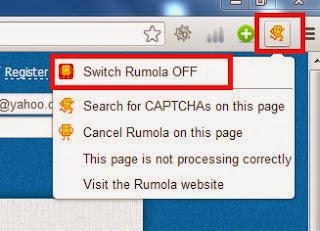
  1. After you download and install this application you will see an icon on the top right corner of your browser, activate it:

  1. Now to use this application, right click on the captcha empty field and click �use this field to enter CAPTCHA�, after that just wait a few seconds and you�re done! Hope you like it.